SpoolSketch - ASME
Pipe, fittings, flanges and valves in inch sizes (ASME, ASTM, MSS).

Draw a pipe spool the way you sketch one in the field. SpoolSketch puts the elbows in the corners, works out the cut lengths, numbers the welds, and builds the bill of materials. Then it makes the sheets your shop prints.
Windows 10/11 (64-bit) · 14-day free trial, no card
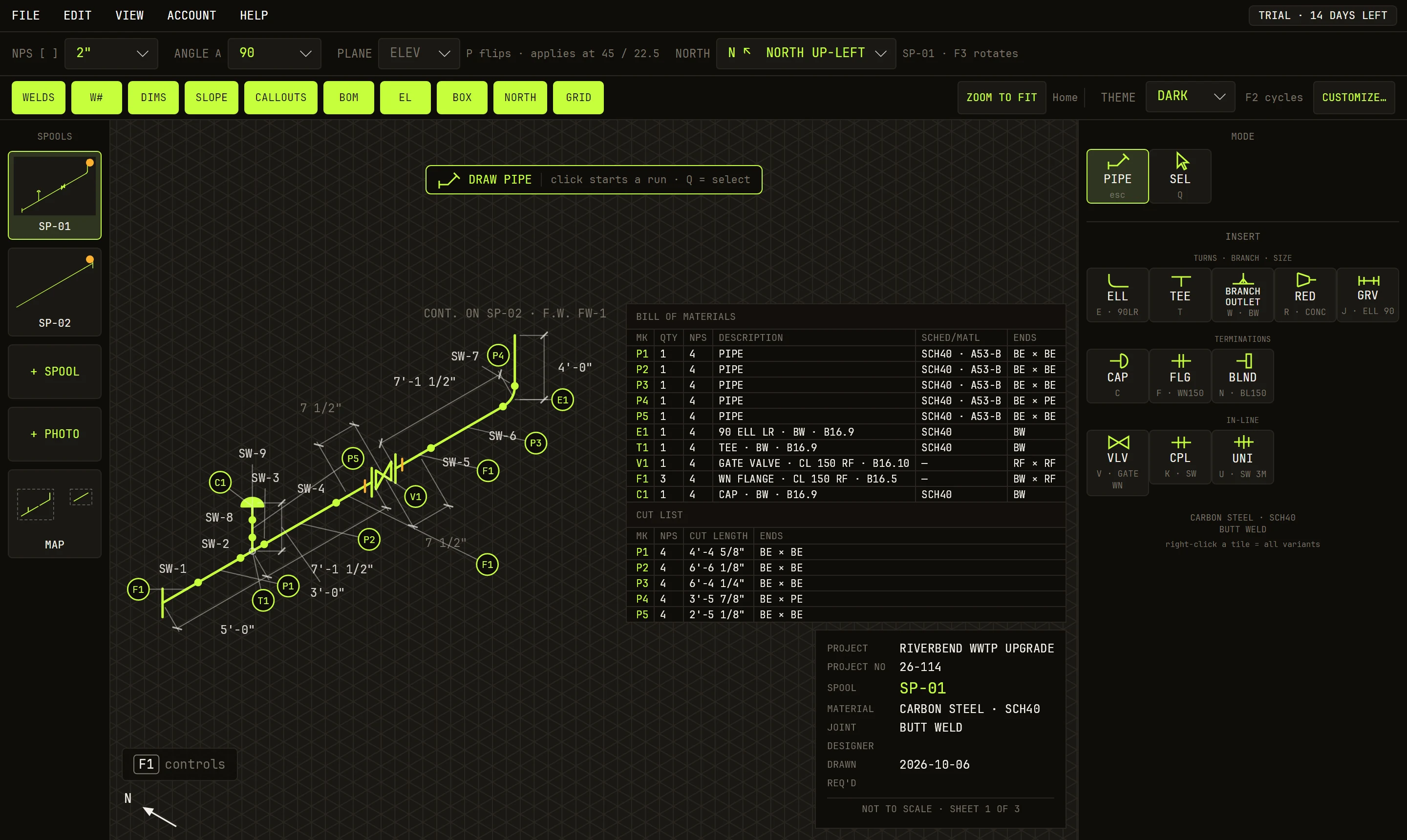
A fitter can sketch a spool in two minutes. Turning that sketch into a sheet the shop can build from takes far longer. Someone has to look up every fitting, take its size off the pipe, work out each cut length, write the bill of materials, and number the welds. One slip of a sixteenth, and a pipe gets cut twice.
SpoolSketch does that part for you. You draw the pipe and type the lengths. It knows the fittings. The cut list and the bill of materials build as you draw. You sketch. It does the math.
Have an idea for a custom app, or one we should offer? Reach out — we build for the field, by request.
Six steps from a blank page to a fab package.
Name the job. Pick the material, the schedule, and how it joins. That sets the fitting tiles you get.
Click to start a run. Type a length and press Enter. Turn and keep going: SpoolSketch puts the elbow in the corner.
Tees, reducers, flanges, valves and more. Click a tile, then click the pipe. A flanged valve brings its two flanges with it.
Dimensions, weld numbers, the bill of materials and the cut list build as you draw. Type over a length to change the pipe.
Add more spools and connect them. The map shows the whole job. Add site photos and mark them up.
Sheets as PDF, JPEG or PNG, on the sheet size you pick. Bills and cut lists as CSV or XLSX. Print them, or send them to the shop.
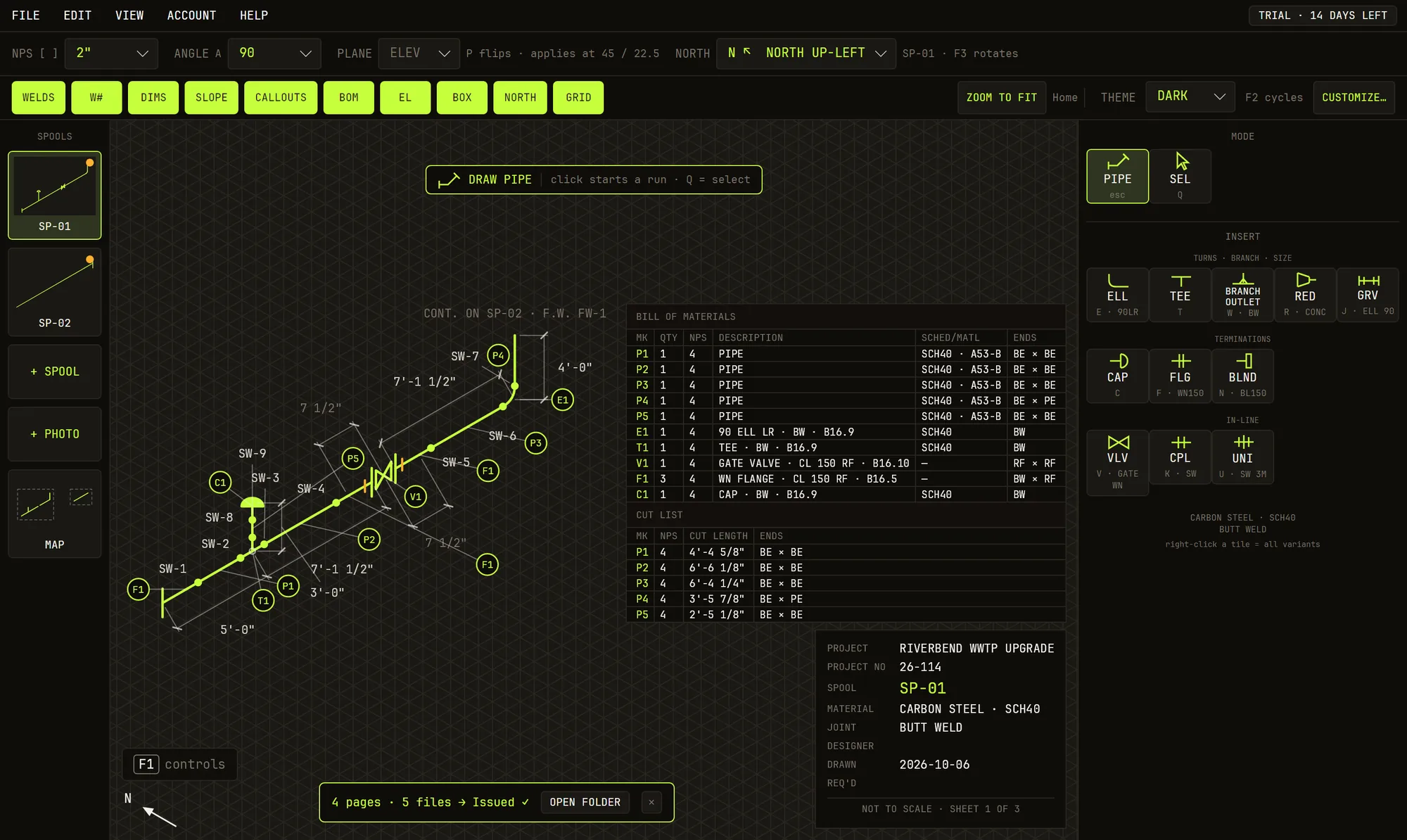
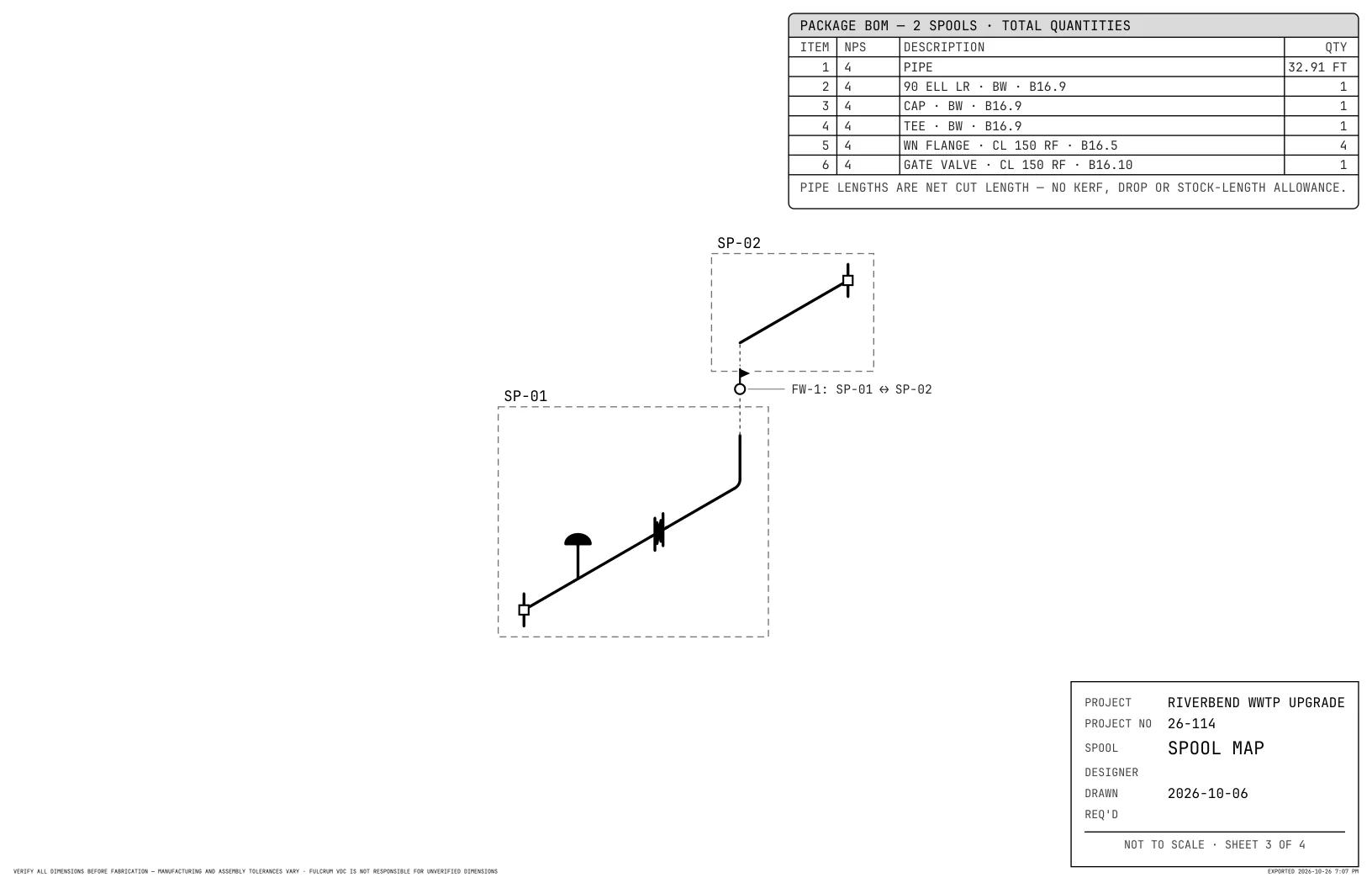
| ITEM | NPS | DESCRIPTION | QTY | LENGTH |
|---|---|---|---|---|
| 1 | 4 | PIPE | 6 | 32'-10 7/8" |
| 2 | 4 | 90 ELL LR · BW · B16.9 | 1 | |
| 3 | 4 | CAP · BW · B16.9 | 1 | |
| 4 | 4 | TEE · BW · B16.9 | 1 | |
| 5 | 4 | WN FLANGE · CL 150 RF · B16.5 | 4 | |
| 6 | 4 | GATE VALVE · CL 150 RF · B16.10 | 1 |
PIPE LENGTHS ARE NET CUT LENGTH — NO KERF, DROP OR STOCK-LENGTH ALLOWANCE.
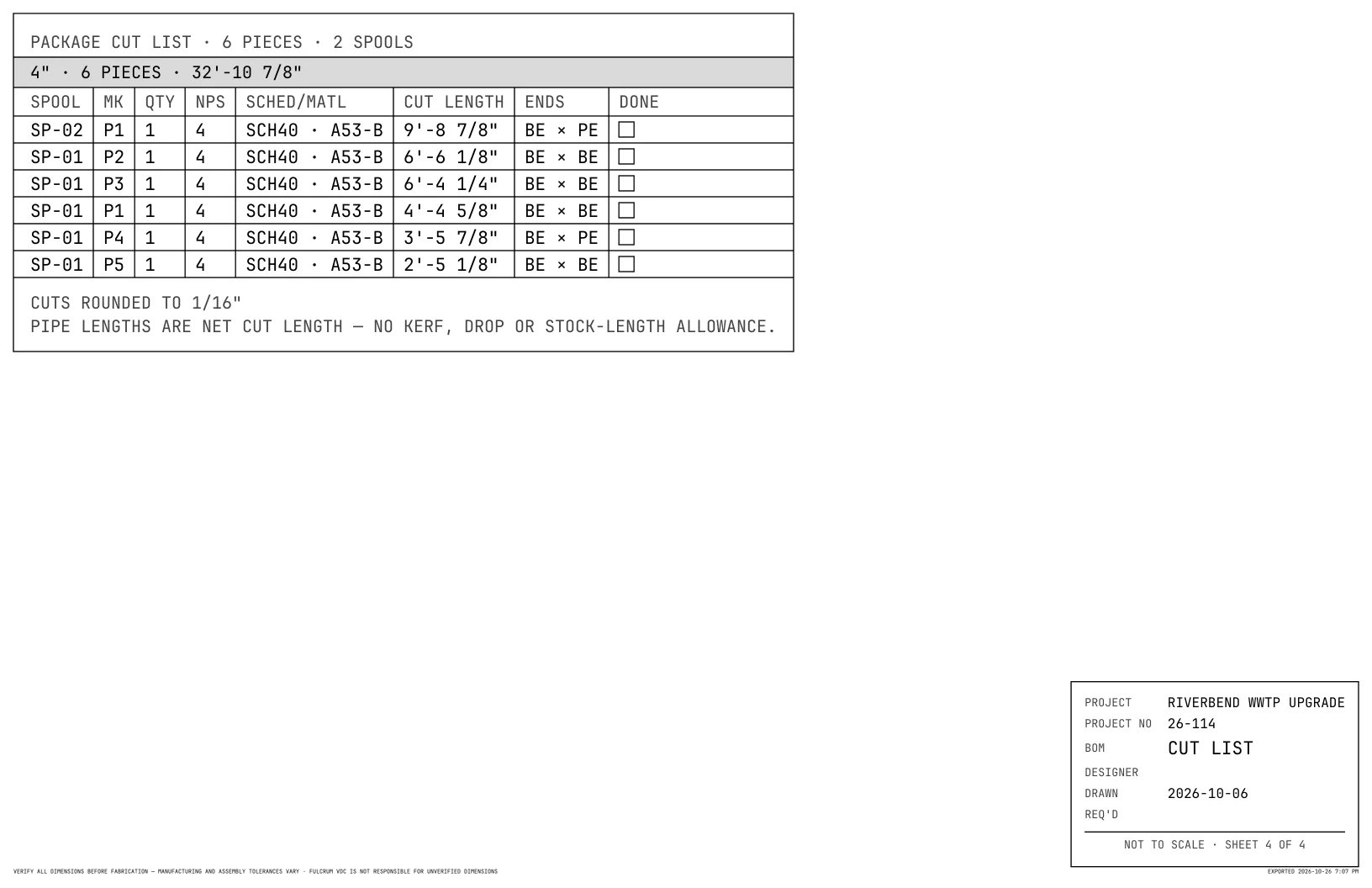
| SPOOL | MARK | NPS | CUT LENGTH | ENDS |
|---|---|---|---|---|
| SP-01 | P1 | 4 | 4'-4 5/8" | BE × BE |
| SP-01 | P2 | 4 | 6'-6 1/8" | BE × BE |
| SP-01 | P3 | 4 | 6'-4 1/4" | BE × BE |
| SP-01 | P4 | 4 | 3'-5 7/8" | BE × PE |
| SP-01 | P5 | 4 | 2'-5 1/8" | BE × BE |
| SP-02 | P1 | 4 | 9'-8 7/8" | BE × PE |
CUTS ROUNDED TO 1/16"

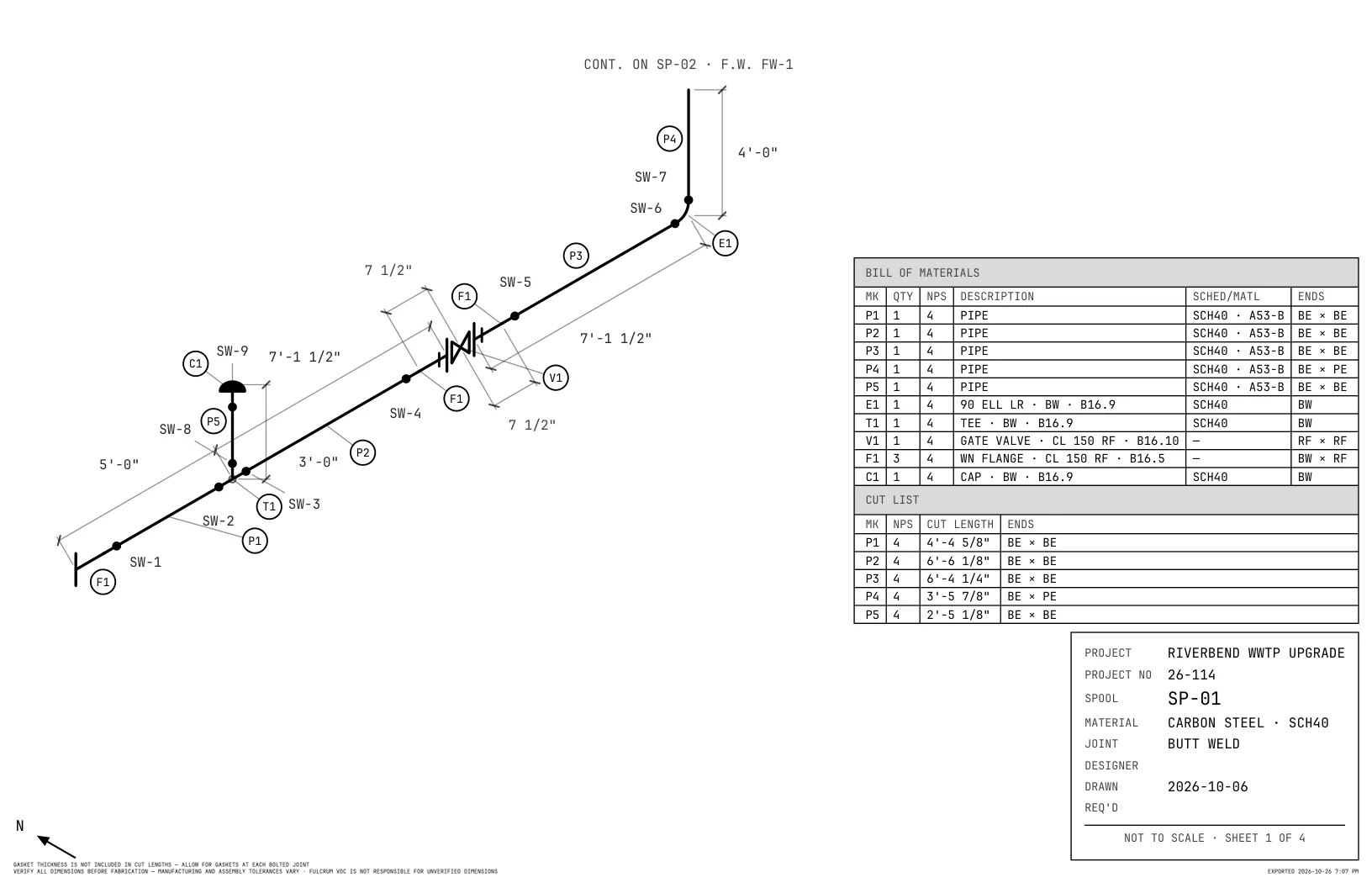
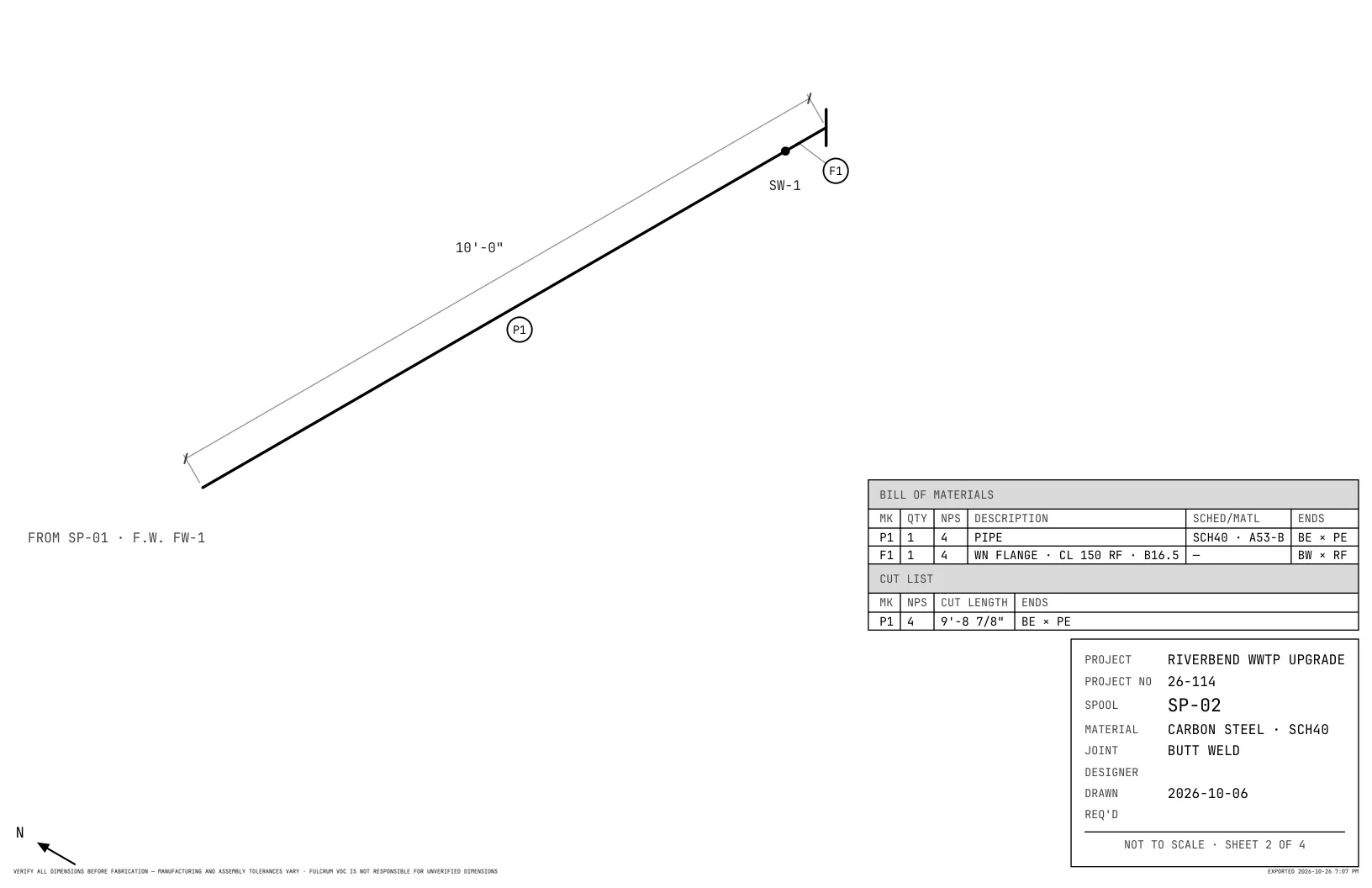
The sheet: drawing, bill of materials, cut list and title block. Sheets print black on white, whatever theme your screen is in, unless PRINT COLORS or PRINT TYPOGRAPHY is ticked in FILE ▸ APPEARANCE…

The map: every spool in the package, how they connect, and the totals for the job.
Fittings and flanges take their sizes from ASME and MSS tables and makers' catalogs. The source of each family of parts is listed in SpoolSketch under HELP, ABOUT SPOOLSKETCH - ASME, DIMENSION SOURCES.
Place a flanged valve and SpoolSketch adds its two mating flanges and cuts the pipe for them. Pick weld neck, slip-on, threaded, socket weld, or lap joint with a stub end.
Each cut line shows how the cut was reached: the drawn length, less every fitting takeout, set-back, NPT thread engagement (ASME B1.20.1) and weld gap.
Set CUT LENGTHS for each package: feet and inches or inches and fractions, to 1/8", 1/16", 1/32" or 1/64"; feet and decimal inches, decimal inches or decimal feet; or millimeters.
Sixteen sizes, all landscape: LETTER, ANSI B to E, ARCH A to E with E1, and ISO A4 to A0. Export as PDF, JPEG or PNG.
Every spool gets a bill of materials and a cut list, on the sheet and as CSV or XLSX.
Every weld gets a number. Click one to make it a shop weld, a field weld or a field-fit weld.
Set the butt-weld root gap, the socket pull-back and the field-fit trim. Save them with SAVE AS ORG DEFAULT in FILE ▸ STANDARDS…, and every new package starts with them.
SpoolSketch refuses an edit that would leave a pipe with no length, and says why.
After the first save, SpoolSketch keeps a spare copy beside your file as you work, and offers it back if the app did not close cleanly.
Drawings are saved as files wherever you choose. SpoolSketch does not send your drawings, bills of material, file names or project details.
A signed-in person can use SpoolSketch on two devices.
Press F1 to open CONTROLS, a window listing every key and click. It opens each time SpoolSketch starts; drag it anywhere, even to another screen. F1 closes it.
To keep the controls on paper, choose HELP ▸ CONTROLS CHEAT SHEET (PRINTABLE), or PRINT in the CONTROLS window. It opens a one-page sheet for 8.5×11 paper.
Bolted joints are drawn with a thin gap, so they read as bolted, not welded.
Pick the app for the sizes you work in.
Pipe, fittings, flanges and valves in inch sizes (ASME, ASTM, MSS).
Pipe, fittings, flanges and valves in metric sizes (EN, ISO).
Coming soon. Your SpoolSketch subscription will cover it.
Coming soon to iPad on the App Store and to Android on Google Play.
Work email in, ZIP out — no account to download. Every build’s SHA-256 is published.
Prefer to read first? Grab the user manual (PDF).
SpoolSketch has a 14-day trial. After the trial it costs $20 per user per month.
One subscription covers SpoolSketch - ASME and, when it comes, SpoolSketch - Metric.
$0
14 days · No card$20
Per user · Per monthWhen a trial or a subscription ends, SpoolSketch becomes view only. Your files still open and you can look at them. You cannot edit, start a new drawing or a new package, or export.
SpoolSketch - ASME draws piping isometrics for spool sheets in inch sizes, with pipe, fittings, flanges and valves from ASME, ASTM and MSS tables and makers' catalogs. Every spool gets a bill of materials and a cut list.
SpoolSketch - ASME draws inch sizes, and its CUT LENGTHS setting can give cut lengths in millimeters. SpoolSketch - Metric, for pipe, fittings, flanges and valves in metric sizes (EN, ISO), is coming soon. Your SpoolSketch subscription will cover it.
Sixteen, in landscape: LETTER, ANSI B, C, D and E, ARCH A, B, C, D, E1 and E, and ISO A4, A3, A2, A1 and A0. A new package starts on ANSI B 11×17.
No. Drawings are saved as files wherever you choose. SpoolSketch does not send your drawings, bills of material, file names or project details.
An internet connection to sign in, and then at least once every 7 days. Drawing and exporting work offline. The internet is needed for the licence check-in and to email your exported files to the shop. SpoolSketch is also view only when it has not checked in online for more than 7 days, until it connects again.
SpoolSketch becomes view only. Your files still open and you can look at them. You cannot edit, start a new drawing or a new package, or export. Work you had not saved when that happened can still be saved.
Yes. A signed-in person can use SpoolSketch on two devices.
Coming soon to iPad on the App Store and to Android on Google Play.
SpoolSketch works out fitting takeouts from dimension tables that Fulcrum VDC compiled from published standards and manufacturers' catalogs. Where SpoolSketch, its manual, a sheet note or a table names a standards body or a manufacturer, the name only identifies where a dimension came from. Fulcrum VDC, LLC is not affiliated with, sponsored by or endorsed by any standards body or manufacturer named, and their names, product names and designations belong to their owners. The tables are not a substitute for the current standard or catalog, and parts from different makers can differ in size. Check each dimension against the part in hand and the documents governing your job before you cut.
The source of each family of parts is listed in SpoolSketch under HELP, ABOUT SPOOLSKETCH - ASME, DIMENSION SOURCES.
The setup file is code-signed as FULCRUM VDC, LLC. Windows can still show “Windows protected your PC” for a new file until our certificate has built up a reputation with Microsoft. Click More info. Check that Publisher reads FULCRUM VDC, LLC, then click Run anyway.
Download it, sign in with your Fulcrum Hub account, and your 14-day trial starts. No card.
Download SpoolSketch - ASMEBy downloading, you agree to the End-User License Agreement, Terms of Service, and Privacy Policy.
Windows 10/11 (64-bit) · Fulcrum Hub account · Internet to sign in, then at least once every 7 days
SHA-256 (ZIP) 47cf6442b71637d16b866b32e761c84dc9a552a2276c5537f39de7c2f1873d94
Apple, iPad and App Store are trademarks of Apple Inc. Android and Google Play are trademarks of Google LLC.